


Description
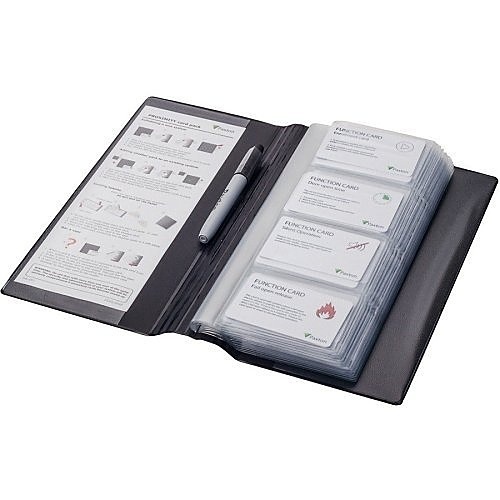
**Overview** – Proximity card packs are designed for seamless integration with proximity access control systems such as the Proximity Compact, Easyprox Compact, and Switch2 models. Each card pack includes 10 cards packaged in convenient wallets and utilizes an intuitive ‘shadow card’ management system for efficient card administration.
**Installation Process** – To set up the access control system, begin by enrolling the first card pack using its Enrolment card. For additional packs, present the original Enrolment card followed by the Enrolment card from the new pack. Use the remaining cards for further system configuration:
– **Door Open Time Card**: Adjusts the duration for which the door remains unlocked.
– **Fail Open Release Card**: For proximity compact and Easyprox compact systems, this card modifies the lock output. In Proximity Compact systems, it toggles the lock operation suitable for a fail-open mechanism, while in Easyprox Compact systems, it toggles the lock between locked and unlocked states.
– **Silent Operation Card**: Mutes and unmutes the sounder in the reader (exclusive to compact systems).
**System Operation** – User cards are organized in wallets, each paired with a matching shadow card for easy user management. After system installation, user cards are immediately active and ready for distribution. To assign a user card, simply remove it from the wallet and record the user’s name on the associated shadow card. The user can now use their card for access. To invalidate a user card, remove its shadow card from the wallet and present it to the necessary readers on the premises, effectively deactivating the card.







Follow us